Choosing accounting software is one of the first decisions a new business owner makes, and it's one that sticks with you for years. QuickBooks Online and Xero are the two dominant cloud platforms for small businesses in Canada, and both are solid choices. But they're not identical, and the differences matter depending on your business type, how hands-on you want to be, and what your accountant prefers. Here's an honest side-by-side comparison to help you decide.
Overview: Two Different Philosophies
QuickBooks Online (QBO) has been the default choice for Canadian small businesses for over two decades, first as desktop software and now as a cloud platform. It's built around the idea that business owners - not just accountants - will be using it daily. The interface is designed to feel approachable, with guided workflows and a dashboard that surfaces cash flow and profit at a glance.
Xero launched in New Zealand and has grown into a genuine global competitor. Its design philosophy leans toward elegance and simplicity, with a clean interface that accountants tend to love. Xero has historically been stronger in markets like Australia and the UK but has steadily improved its Canadian feature set over the past several years.
Pricing Comparison (Canadian Plans)
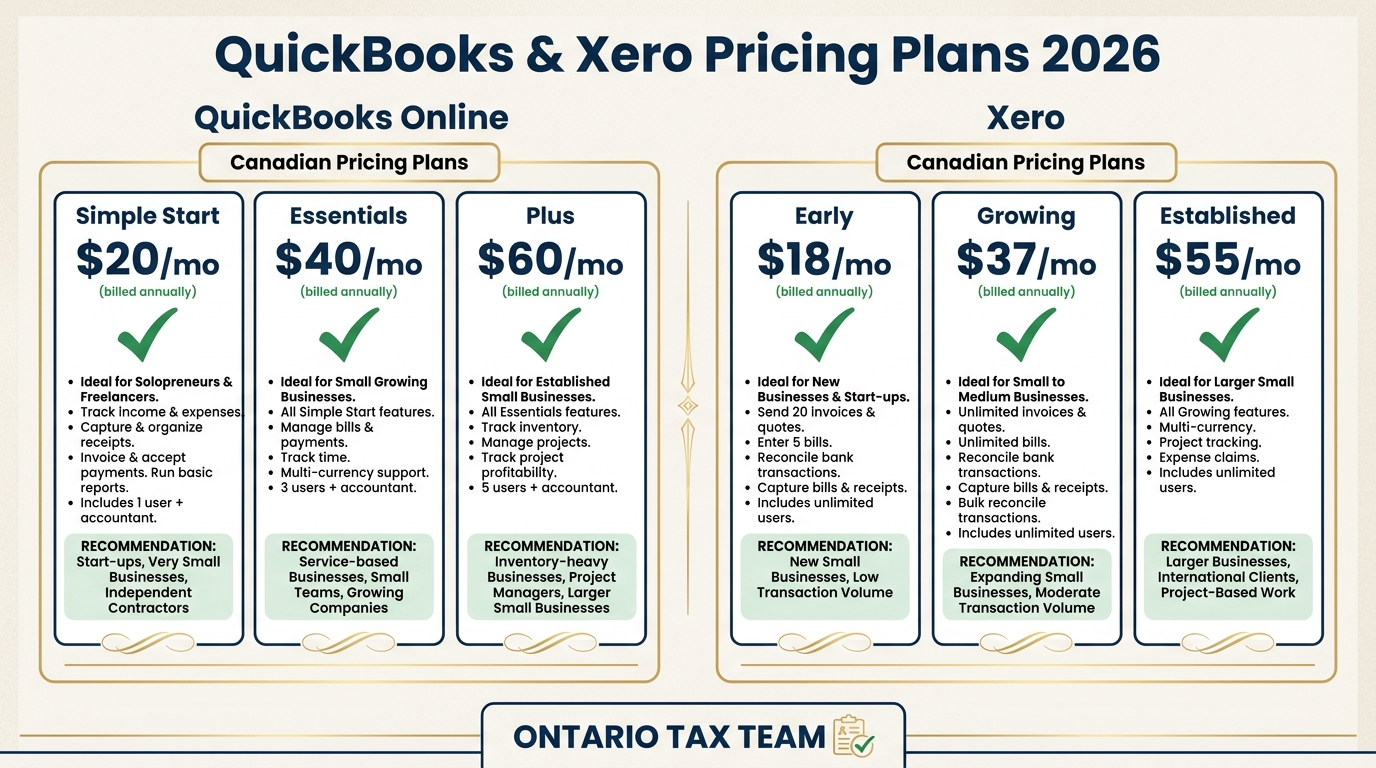
Both platforms use tiered monthly pricing. As of 2026, here's the Canadian pricing breakdown:
QuickBooks Online
- Simple Start: ~$22/month - 1 user, basic invoicing, expense tracking, HST reporting
- Essentials: ~$44/month - 3 users, adds bill management, time tracking
- Plus: ~$62/month - 5 users, adds inventory tracking, project profitability, budgeting
- Advanced: ~$124/month - 25 users, custom roles, batch invoicing, advanced reporting
Xero
- Starter: ~$22/month - 20 invoices and 5 bills per month, bank reconciliation, HST
- Standard: ~$40/month - Unlimited invoices and bills, adds bulk reconciliation
- Premium: ~$54/month - Adds multi-currency, expense claims, project tracking
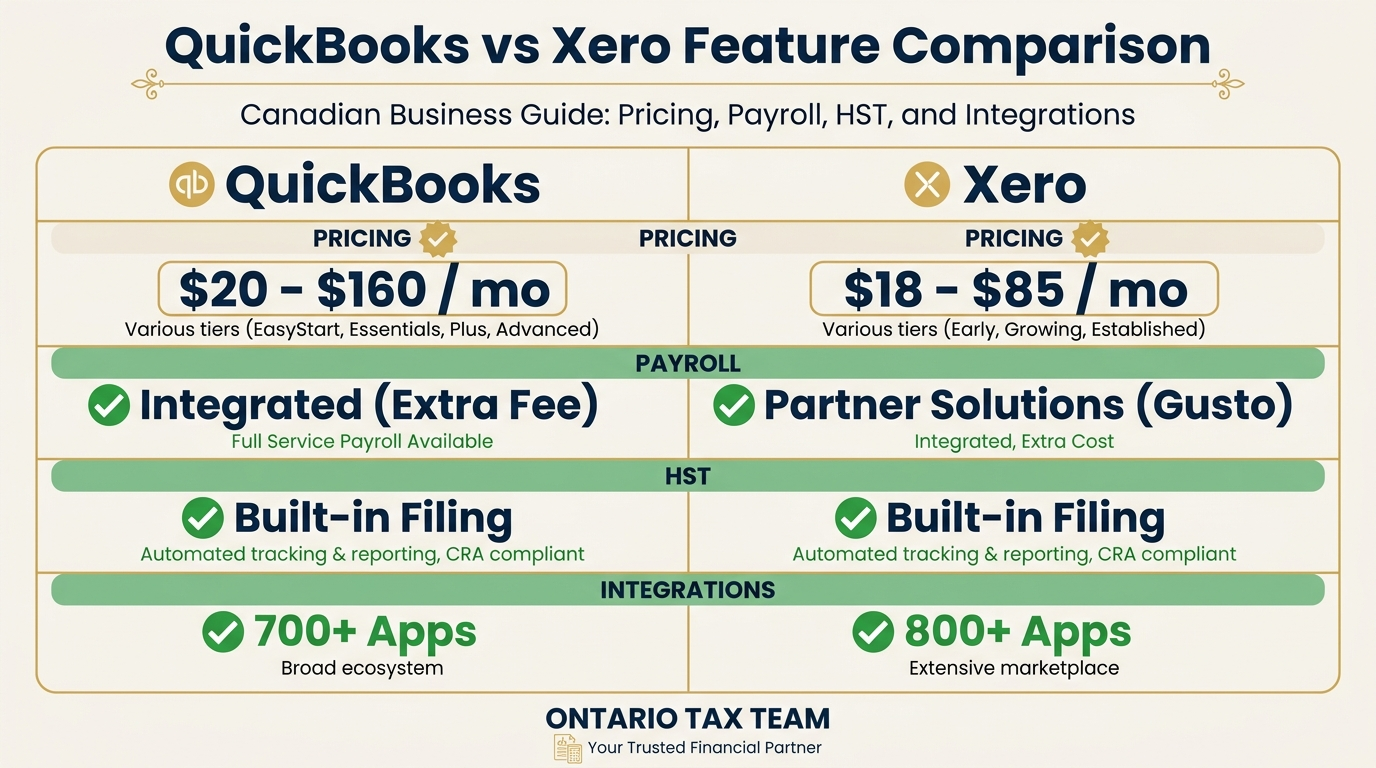
The headline prices are similar, but Xero's Starter plan is limited to 20 invoices per month, which makes it a non-starter for most active businesses. On the other hand, Xero includes unlimited users on every plan, while QBO limits users and charges more as you add team members. If you have partners or staff who need access, Xero's all-plan user access is a meaningful cost advantage.
Features Head-to-Head
Invoicing
Both platforms handle invoicing well. QBO offers more customization on invoice templates out of the box - logo placement, colour schemes, and payment terms are easy to adjust. Xero's invoices are clean but more rigid in layout. Both support recurring invoices, automatic payment reminders, and online payment integration (Stripe, PayPal, or their own payment gateways).
Bank Feeds and Reconciliation
This is where you'll spend most of your time in either app, and both connect to major Canadian banks. QBO imports transactions and suggests matches; Xero does the same with a slightly more streamlined reconciliation screen. Many bookkeepers find Xero's bank reconciliation workflow faster once you're used to it, but QBO's is perfectly functional. Both support bank rules to auto-categorize recurring transactions.
HST Reporting
For Canadian businesses, HST handling is non-negotiable. Both platforms calculate HST on sales and track Input Tax Credits on purchases. QBO generates the HST return summary directly, making it easy to transfer numbers to your filing. Xero also produces an HST report, though some accountants note that QBO's HST summary maps more directly to the CRA's format. Both support provincial sales tax variations for businesses operating across provinces.
Payroll
QuickBooks has a significant edge in payroll for Canadian businesses. QBO's built-in payroll module handles CPP, EI, federal and provincial tax withholdings, T4 generation, and ROE filing. It's integrated directly into the platform, so payroll runs post to your books automatically.
Xero's Canadian payroll is available through a partnership with Wagepoint. It works, but it's a third-party integration rather than a native feature. If payroll is a core function for your business, QBO's integrated approach is smoother.
Multi-Currency
If you invoice clients in USD or other currencies, Xero handles multi-currency at its Premium tier and does it well - automatic exchange rate lookups, unrealized gains/losses tracking, and per-currency bank accounts. QBO also supports multi-currency, but some users find Xero's implementation more intuitive for ongoing foreign currency transactions.
Reporting
QBO offers a broader library of built-in reports, including profit and loss by class, location, or customer. The Advanced plan adds custom report builder functionality. Xero's standard reporting is clean and covers the essentials (P&L, balance sheet, aged receivables, budget vs. actual), but power users sometimes find it limiting without third-party add-ons.
Ease of Use
This one's subjective, but the consensus among our clients tends to follow a pattern. Business owners with no accounting background generally find QBO easier to pick up. The navigation is more guided, the dashboard is more visual, and the help documentation is extensive. Xero's interface is cleaner and faster, but it assumes a bit more familiarity with accounting concepts. Once you're past the learning curve, many users find Xero's day-to-day workflow slightly more efficient.
Mobile Apps
Both offer mobile apps for iOS and Android. QBO's app lets you create invoices, photograph receipts, track mileage, and check your dashboard. Xero's app covers similar ground with receipt scanning, invoicing, and bank reconciliation on the go. Both are functional, but neither replaces the full desktop experience for heavier tasks like payroll runs or report building.
Integrations
QBO wins on sheer volume of integrations - it connects with hundreds of third-party apps for time tracking, inventory, CRM, e-commerce, and payment processing. Xero's marketplace is growing but smaller. That said, Xero's API is considered developer-friendly, so if you use niche or custom tools, integration may actually be easier with Xero.
Accountant Access
Both platforms offer free accountant access, which is essential for working with your bookkeeping service. QBO Accountant gives your bookkeeper or accountant a dedicated portal with client management tools, batch transaction editing, and reclassification features. Xero's accountant tools are similarly robust, with a Partner Dashboard that many accounting firms prefer for managing multiple clients.
Ask your accountant which platform they prefer. Most virtual bookkeeping services work with both, but having your accountant on their preferred platform means faster turnaround and fewer compatibility issues.
Which Should You Choose?
There's no objectively “better” platform - it depends on your situation:
- Sole proprietors and freelancers: Either platform works. If you want the lowest friction setup and don't need payroll, Xero's Standard plan is slightly cheaper. If you value guided setup and extensive help resources, QBO Simple Start is hard to beat.
- Small corporations with employees: QBO's integrated payroll gives it an edge. The combined bookkeeping-plus-payroll workflow is smoother than managing a separate payroll tool alongside Xero.
- Growing businesses with multiple team members: Xero's unlimited users across all plans make it more cost-effective as your team grows. If you're adding staff who need access to invoicing or expense entry, you won't face per-user charges.
- Businesses with international clients: Xero's multi-currency handling is slightly more polished. If you regularly invoice in USD, GBP, or EUR, the workflow is smoother.
Our Recommendation
For most of our Ontario-based small business clients, we recommend QuickBooks Online. The Canadian payroll integration, HST reporting, and the sheer depth of the ecosystem make it the safer default choice. That said, we happily work with clients on Xero and find it an excellent platform, particularly for businesses that don't need built-in payroll or that value a cleaner interface.
Whatever you choose, the most important thing is that you actually use it consistently. The best accounting software in the world is useless if your transactions sit un-reconciled for months. If keeping up with the books isn't your strength, read our bookkeeping tips for small businesses or learn about what a bookkeeper costs- it's likely less than you think.
Key Takeaways
- •QuickBooks Online and Xero are both strong platforms - the best choice depends on your business needs, not a universal ranking
- •QBO has a significant edge in Canadian payroll with its native, integrated payroll module
- •Xero includes unlimited users on every plan, making it more cost-effective for growing teams
- •Ask your accountant which platform they prefer - their efficiency on your file directly affects your costs
Need Help Choosing Accounting Software?
Our bookkeeping team can set up QuickBooks or Xero for your business and manage your books on an ongoing basis. Book a free 15-minute consultation.