Every year after you file your tax return, the Canada Revenue Agency sends you a Notice of Assessment (NOA). It's one of the most important tax documents you'll receive, yet many people glance at the refund amount and toss it aside. That's a mistake. Your NOA contains critical information about your tax account, your RRSP room, and whether CRA has made any changes to what you reported. Understanding this document can help you catch errors, plan for next year, and protect yourself if questions arise down the road.
What Is the Notice of Assessment?
The NOA is CRA's official response to your filed tax return. It confirms that CRA has processed your return and summarizes the results of their assessment. Think of it as a receipt and a report card combined - it tells you what CRA calculated as your taxable income, total tax payable, credits applied, and whether you owe money or are getting a refund.
The NOA is not the same as a tax return. Your tax return is what you file; the NOA is CRA's response. If CRA agrees with everything you reported, the NOA will match your return. If they made changes - for example, disallowing a deduction or correcting a calculation - the NOA will show different numbers than what you filed.
When Do You Receive It?
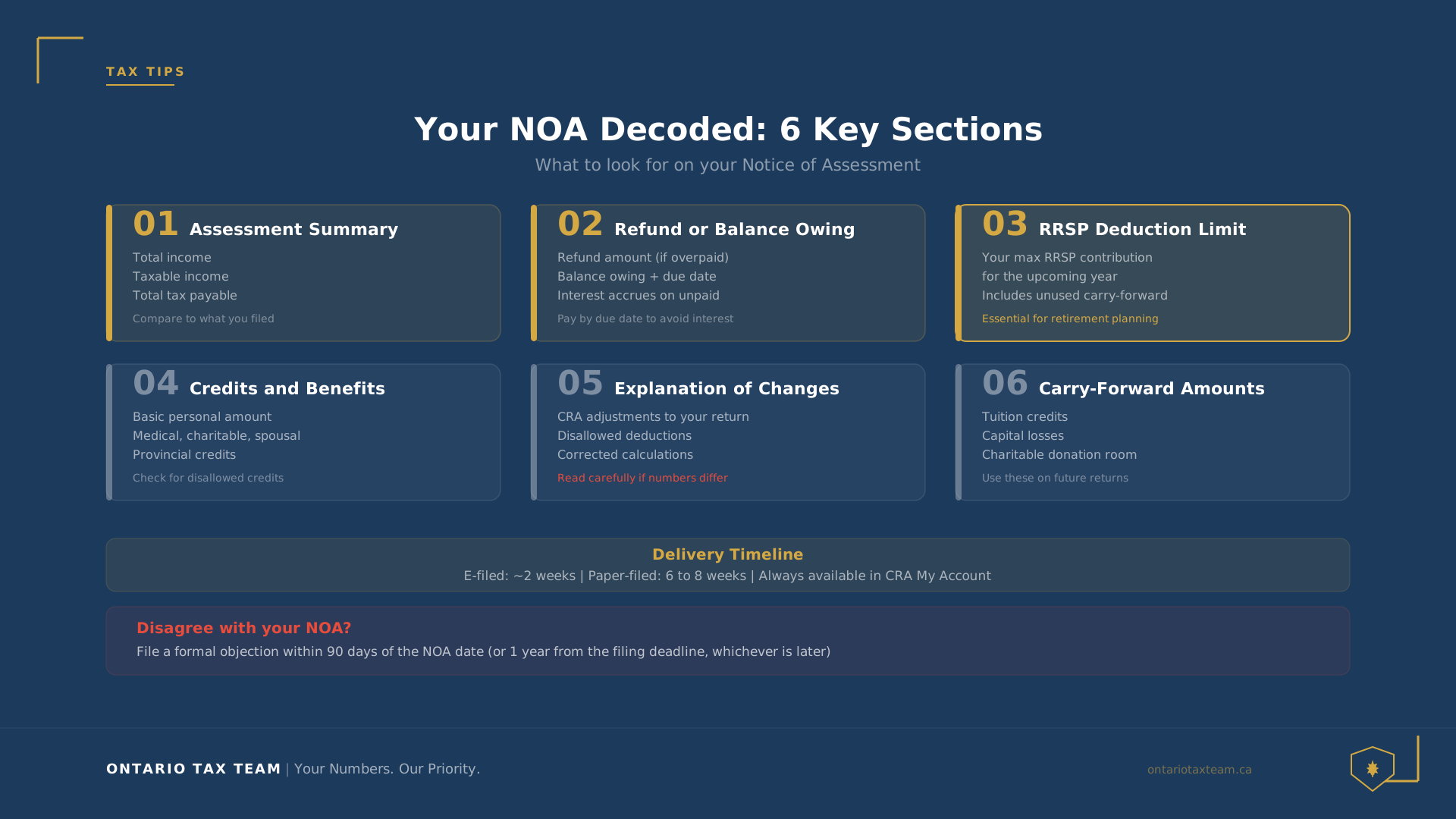
If you filed electronically, you'll typically receive your NOA within two weeks. Paper-filed returns take longer - usually six to eight weeks. You can access your NOA online through CRA My Account at any time after it's been issued. If you use a professional tax preparation service, your accountant can often pull your NOA through their authorized representative access.
CRA also sends the NOA by mail unless you've opted for online-only correspondence through My Account. Even if you receive the paper copy, it's a good idea to save a digital version for your records.
Key Sections of Your NOA
Assessment Summary
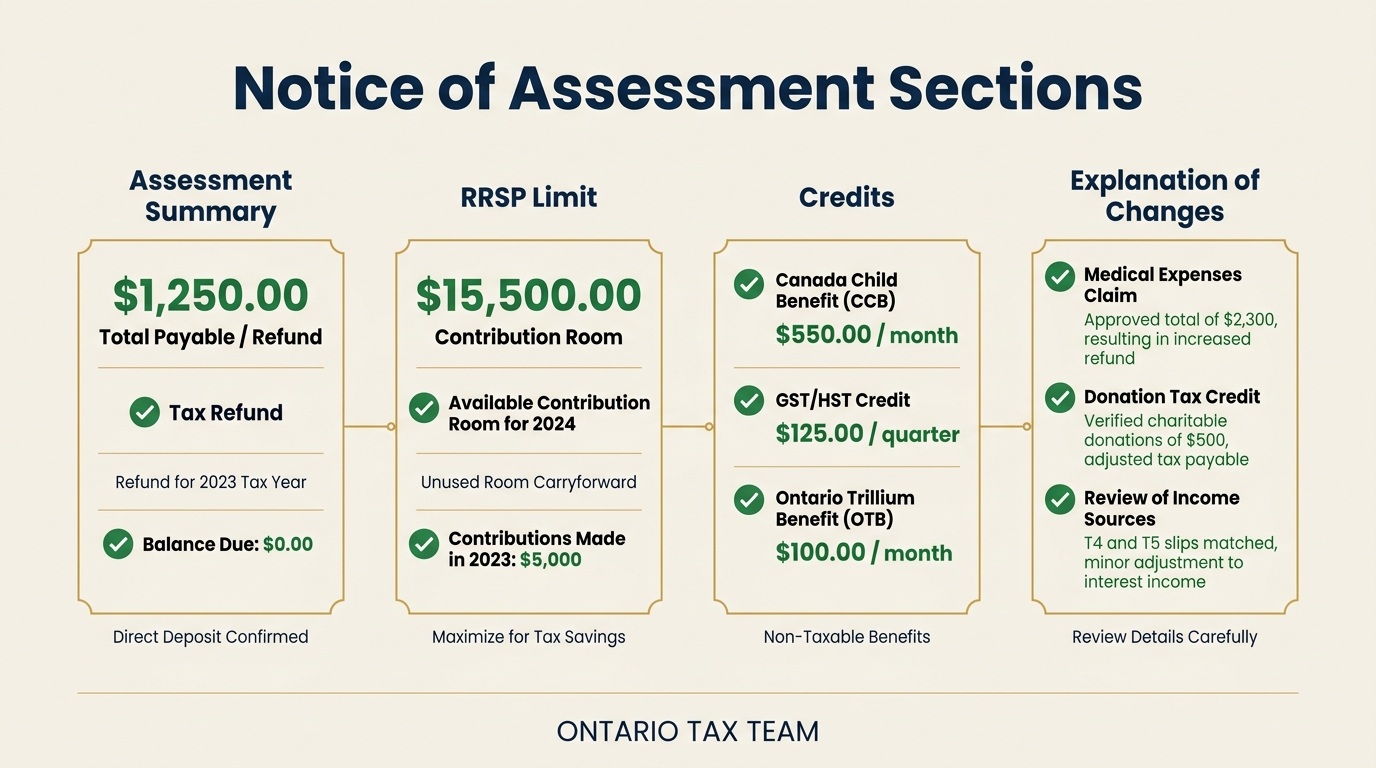
The top section shows the tax year, your total income, taxable income, and total tax payable. It also shows the total credits and deductions CRA applied. If any of these numbers differ from what you reported on your return, CRA will include an explanation in the “Explanation of changes” section further down.
Refund or Balance Owing
This is the number most people look at first. If your tax payments (withholdings, instalments, and other credits) exceeded your total tax payable, you'll see a refund amount. If you owe money, the NOA will show the balance owing along with the due date for payment. Interest accrues on unpaid balances, so pay attention to this date. Understanding when taxes are due in Canada helps you avoid unnecessary interest charges.
RRSP Deduction Limit
Your NOA includes your RRSP deduction limit for the upcoming year. This is the maximum amount you can contribute to your RRSP and deduct on your next tax return. It's calculated as 18% of your previous year's earned income (up to the annual maximum), plus any unused room carried forward, minus any pension adjustment. This number is essential for retirement planning - contributing beyond this limit triggers a penalty tax of 1% per month on the excess.
Credits and Benefits Applied
The NOA lists the tax credits CRA applied to your return, including the basic personal amount, spousal amount, medical expenses, charitable donations, and any provincial credits. If CRA disallowed or reduced a credit you claimed, you'll see the difference here. Review this section carefully to make sure nothing was missed or incorrectly adjusted.
Explanation of Changes
If CRA changed anything on your return, this section explains why. Common changes include: correcting math errors, adjusting credits based on updated information (like a spouse's income), or disallowing claims that weren't supported by documentation. Not every change is an error on your part - some are routine adjustments - but you should review each one to confirm it's correct. Having organized documentsmakes it much easier to verify CRA's changes.
What to Do If You Disagree
If your NOA shows changes you don't agree with, you have options. The approach you take depends on the nature of the disagreement and how quickly you want it resolved.
T1 Adjustment Request
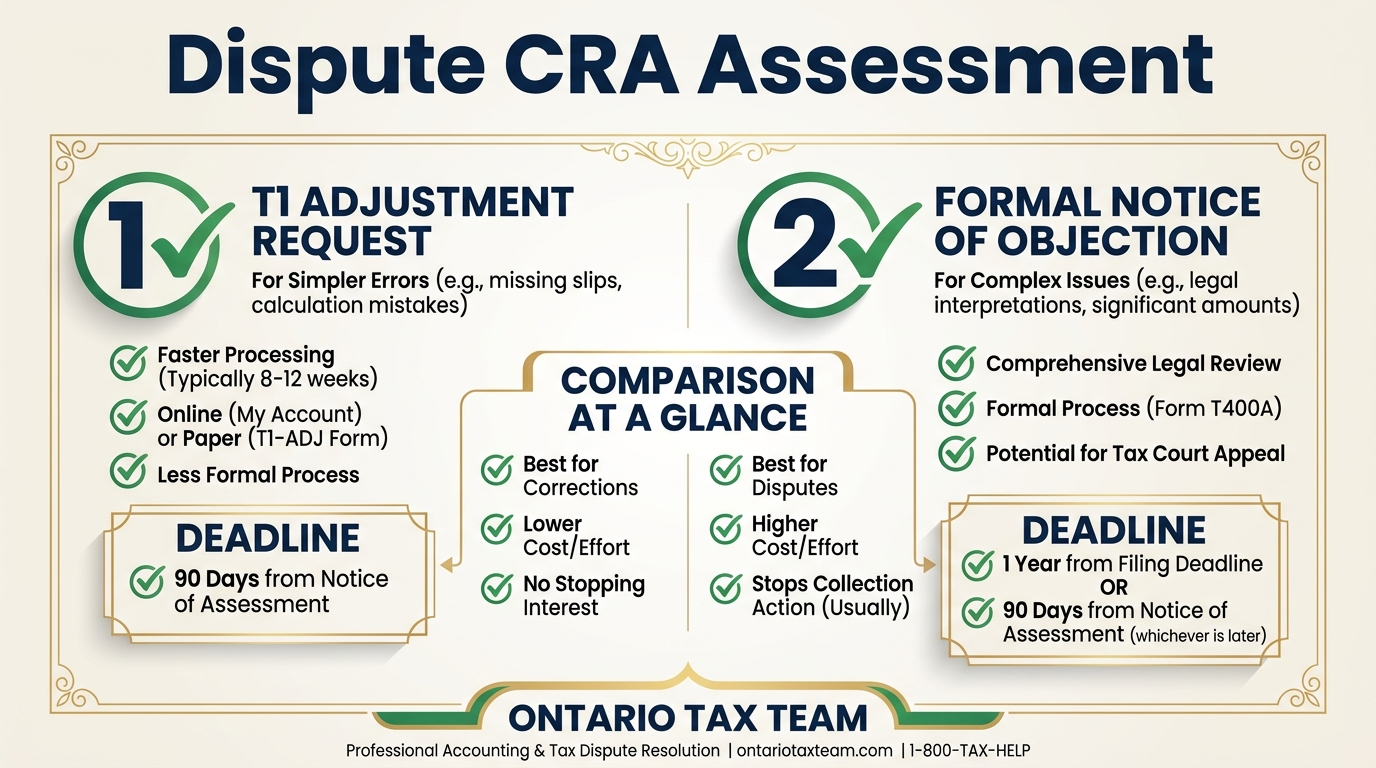
For straightforward corrections - a missing slip, a deduction you forgot to claim, or a simple error - you can file a T1 Adjustment Request. You can submit this online through My Account using the “Change my return” feature, or by mailing Form T1-ADJ. CRA will reassess your return and issue a revised NOA. This process typically takes two to eight weeks for electronic submissions. Avoiding common tax filing mistakes in the first place reduces the need for adjustments.
Filing a Notice of Objection
If you have a substantive disagreement with CRA's assessment - for example, they disallowed a deduction or credit and you believe you're entitled to it - you can file a formal Notice of Objection. This must be done within 90 days of the date on your NOA, or within one year of your filing deadline, whichever is later.
You can file online through My Account, by mail using Form T400A, or by letter. Your objection will be reviewed by the Appeals Division of CRA, which operates independently from the Audit Division. The review process can take several months to over a year, depending on complexity.
While your objection is being reviewed, you generally do not have to pay the disputed amount - but interest continues to accrue. If you ultimately owe the money, you'll owe the interest too. If CRA rules in your favour, the interest is reversed. Having a professional handle your personal income tax can help ensure your filing is accurate and defensible from the start.
Important Timelines
- 90 days: Deadline to file a Notice of Objection after receiving your NOA
- 10 years: CRA generally keeps records for six to seven years, but you can request adjustments for returns up to 10 years old in some cases
- No time limit: T1 Adjustment Requests can be filed for any of the previous 10 tax years
Why You Should Keep Your NOA
Your NOA serves several practical purposes beyond just confirming your tax assessment:
- RRSP planning: It's the most reliable source for your RRSP deduction limit.
- Proof of income: Lenders, landlords, and government programs often require your NOA as proof of income. Mortgage applications, in particular, almost always ask for your most recent NOA.
- CRA disputes: If you ever face an audit or reassessment, your NOA provides a record of what CRA originally assessed and when.
- Benefits eligibility: Programs like the Canada Child Benefit, GST/HST credit, and Ontario Trillium Benefit are calculated based on the income reported on your NOA.
Keep your NOAs for at least six years, or longer if you have carryforward amounts (like capital losses or unused RRSP room) that may be relevant in future years.
Bottom Line
Your Notice of Assessment is more than a refund notification. It's CRA's official record of your tax situation for the year, and it contains information you'll need for financial planning, loan applications, and any future interactions with CRA. Use our tax calculatorto verify the amounts on your NOA match your expectations. Take a few minutes to review it thoroughly when it arrives, and don't hesitate to follow up if something doesn't look right. The sooner you address discrepancies, the easier they are to resolve.
Key Takeaways
- •The NOA is CRA's official response to your tax return - review it carefully every year
- •Check your RRSP deduction limit on your NOA before making contributions
- •You have 90 days to file a Notice of Objection if you disagree with CRA's assessment
- •Keep your NOAs for at least six years - they're needed for loans, benefits, and CRA disputes
Questions About Your Notice of Assessment?
Our tax team can review your NOA, file adjustments, and handle objections on your behalf. Book a free 15-minute consultation.